everHome Community
Willkommen in der everHome Community!
Die Community besteht aus verschiedenen Bereichen in denen sich everHome-Benutzer untereinander austauschen können. Hier findest du sicher den ein oder anderen nützlichen Hinweis. Auch das everHome-Team schaut hier gerne vorbei, klärt Fragen und nimmt eure Anregungen auf.
Ecotracker Integration über Hacs möglich Version 1.0.5 stefanseeger
Benutzer 32983
Mitglied
Beiträge: 1
Registriert: 14.09.2023
Ecotracker Home Assistant Integration
Give me a tip: paypal.me/StefanSeeger
Custom integration for Ecotracker energy monitoring device. It directly accessed the local HTTP server.
Installation
Prerequisites
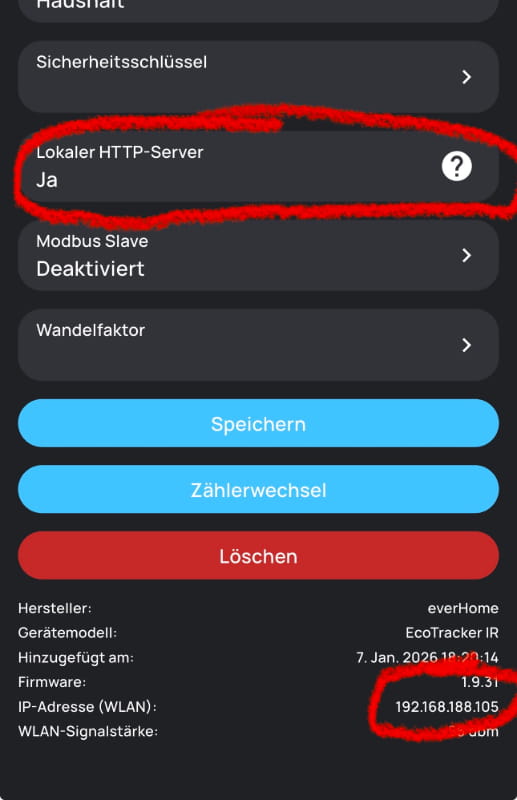
- Make sure your ecotracker is reachable in the local network via (http://your.local.ip.address/v1/json).
- If not, please activate the "Local http server" of your Ecotacker device
HACS (Recommended)
- Add this repository as a custom repository in HACS:
- Go to HACS > Integrations
- Click the three dots in the top right
- Select "Custom repositories"
- Add the repository URL and select "Integration" as the category
- Click "Install"
- Restart Home Assistant
Manual Installation
- Copy the
custom_components/ecotrackerfolder to your Home Assistant'scustom_componentsdirectory - Restart Home Assistant
Configuration
- Go to Settings > Devices & Services
- Click "+ Add Integration"
- Search for "Ecotracker"
- Enter your device's IP address
- Set the polling interval (default: 60 seconds, range: 1-86400 seconds)
Changing Settings
To change the polling interval after setup:
- Go to Settings > Devices & Services
- Find your Ecotracker device
- Click "Configure"
- Update the polling interval and IP address as needed
Features
- Configurable polling interval (1-86400 seconds, default: 60 seconds)
- Multiple sensors:
- Power (W)
- Power average (last minute)
- Power phase 1 (optional)
- Power phase 2 (optional)
- Power phase 3 (optional)
- Energy In (kWh)
- Energy Out (kWh)
- Compatible with Home Assistant Energy Dashboard
- Config flow UI for easy setup
- Options flow for changing settings without re-adding the integration
Sensors
sensor.ecotracker_power- Current power consumption in Wattssensor.ecotracker_power_phase_1- Power consumption of phase 1 in Watts (optional)sensor.ecotracker_power_phase_2- Power consumption of phase 2 in Watts (optional)sensor.ecotracker_power_phase_3- Power consumption of phase 3 in Watts (optional)sensor.ecotracker_power_average- Average power consumption (last minute)sensor.ecotracker_energy_in- Total energy imported in Watt-hourssensor.ecotracker_energy_out- Total energy exported in Watt-hours
xxxxxxxxxxxxxxxxxxxxxxxxxxxxxxxxxxxxxxxxxxxxxxxxxxxxxxxxxxxxxxx
Ich habe so meine Ecotracker bequem ins HA eingebunden.
hanker
Mitglied
Beiträge: 17
Registriert: 13.04.2024
Moin.
Könntest Du einmal kurz schreiben, was denn als Repository eingetragen werden muss?
Könntest Du einmal kurz schreiben, was denn als Repository eingetragen werden muss?
Habe Dein https://github.com/stefanseeger/ecotracker gefunden, das will er aber nicht haben, wenn ich unter dem "App-Store" -> "Repositories" -> "Hinzufügen" wähle.
LG
René
hanker
Mitglied
Beiträge: 17
Registriert: 13.04.2024
Hat sich erledigt: Man muss halt erst HACS installieren. [facepalm]
Wie das am Einfachsten geht, findet man hier:
https://hacs.xyz/docs/use/download/download/#to-download-hacs
LG
René
Wie das am Einfachsten geht, findet man hier:
https://hacs.xyz/docs/use/download/download/#to-download-hacs
LG
René
Benutzer 96082
Mitglied
Beiträge: 1
Registriert: 04.09.2026
Ich habe den Ecotracker mit einem Jackery Solarvault 3 Pro Max gekoppelt. Wenn die Verbindung steht, ist aber kein ZUgriff mehr auf die lokale API von einem anderen System aus möglich (z.B. Home Assistant, oder auch einfach aus dem Browser). Jackery stellt via MQTT leider auch keine Daten bereit.
Gibt es hierzu eine Lösung? Habe den extra gekauft, um neben Nulleinspeisung mit dem Solarvault 3 Pro Max auch noch Zählerstand etc in HA anzeigen zu können... Scheint so nicht zu funktionieren!
Felix